
Faster autoscaling than other providers
Tokens processed every week
Lower cost at high throughput
Y Combinator
Built for teams that outgrew the hyperscaler bill.
The network absorbs failures and load spikes before they reach your users.
Global GPU capacity
A global mesh of GPUs, all in one network.
Automatic failover
Traffic reroutes to a healthy node in milliseconds.
Instant load balancing
Requests spread across every available node.
Uptime SLA available
Committed uptime, latency, and throughput on dedicated capacity.
Everything you need to run AI.
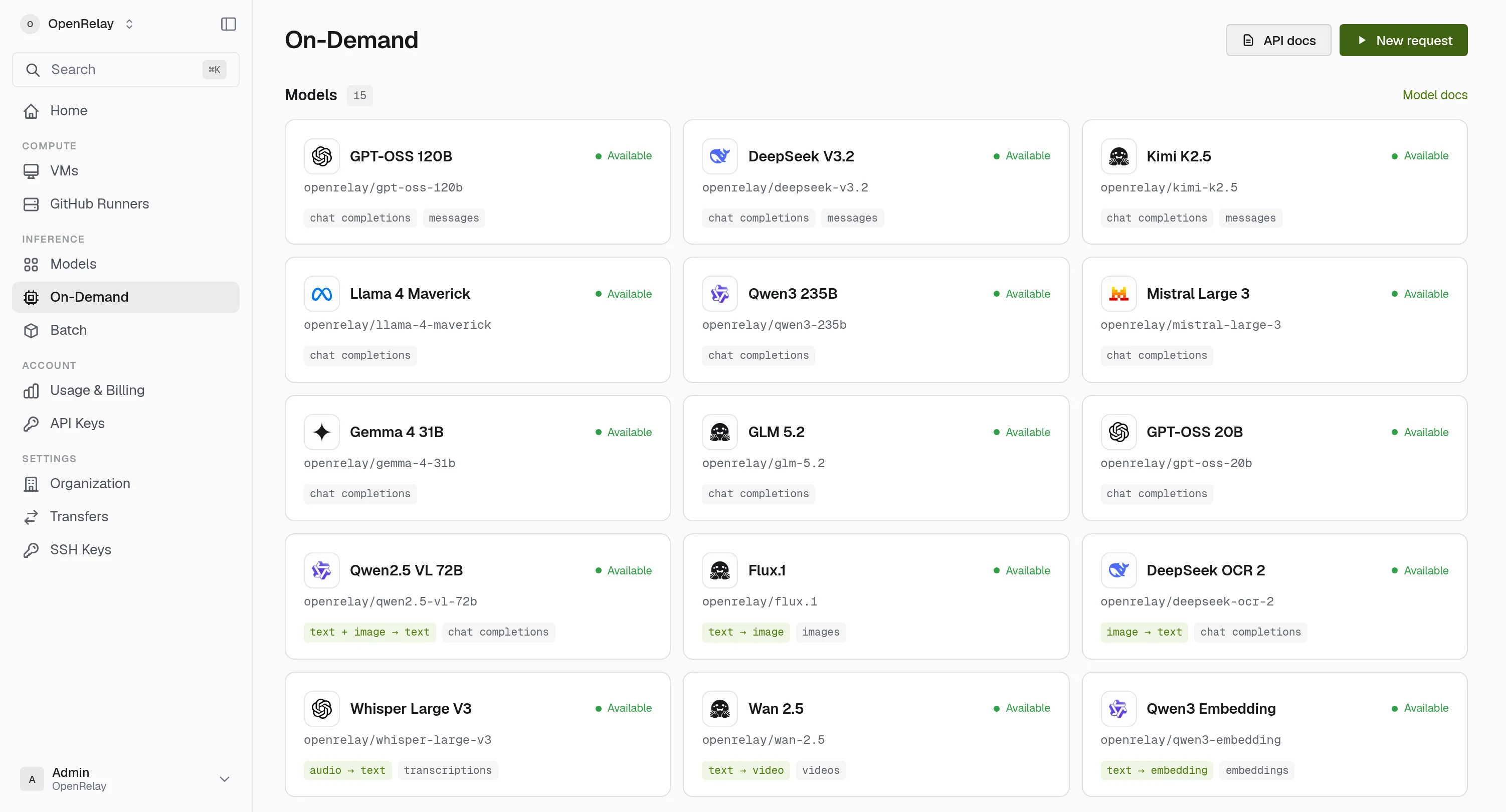
Run the same models with serverless inference, dedicated GPUs, or batch jobs, all through one API and one network.




Serverless inference
Hosted models behind one endpoint. Capacity scales with your traffic, and you pay for what you generate.
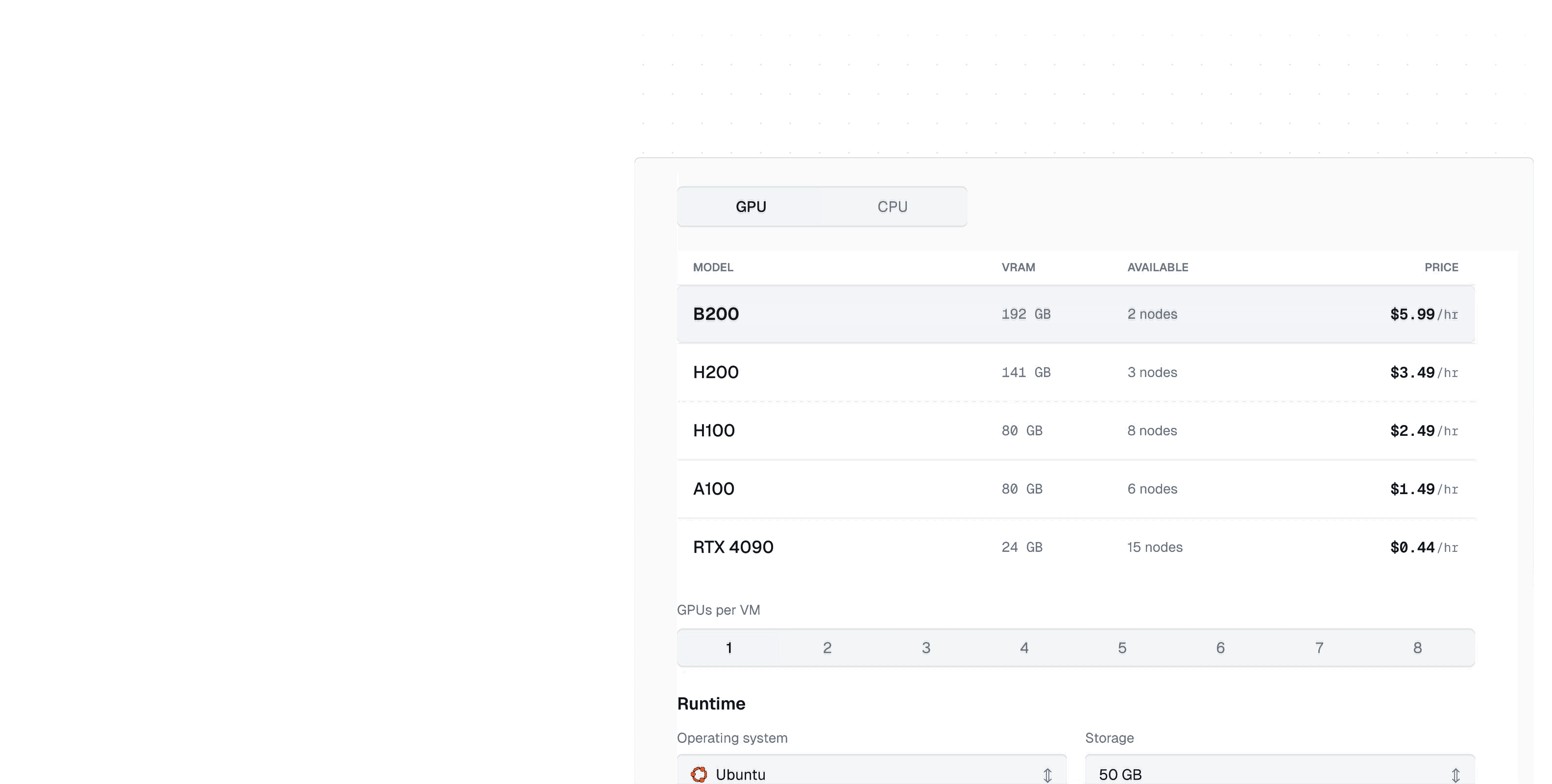
Dedicated compute
Take a GPU when you want control: your runtime, your image, metered per minute.
Batch jobs
Queue heavy workloads and run them at a lower price than interactive traffic.
Your terminal is the console. So is your agent.
Everything the dashboard does ships in the orl CLI, and one command serves the same API to Claude and any MCP client.
Install orlDeploy from the command line.
orl wraps the full OpenRelay API: launch a GPU VM, drop into SSH, and script your fleet from a shell or CI.
$ brew install openrelayinc/tap/orl
$ orl deploy trainer \
    --gpu-model "h100" --connect
✓ training-01 running
root@training-01:~$ nvidia-smi
NVIDIA H100 80GB HBM3, 81559 MiB
root@training-01:~$
Hand the keys to your agent.
orl mcp serve exposes the platform as MCP tools. Claude deploys VMs, reads usage, and manages resources with your access, or inspect-only with --read-only.
$ claude mcp add openrelay \
    -- orl mcp serve
✓ Added stdio MCP server openrelay
• vms_create { "name": "training-01",
    "gpuModelId": "h100",
    "gpuCount": 1 }
⎿  training-01 → running
A New Architecture for AI Compute
Built on both owned GPU infrastructure and a global distributed GPU network.

OpenRelay API
Control OpenRelay from your own stack.
Inference API
Point any OpenAI SDK at OpenRelay and change nothing else.
- OpenAI-compatible
- Drop-in for existing clients
- Automatic routing
- Latency, cost, and health aware
import OpenAI from "openai";

const client = new OpenAI({
  baseURL: "https://api.openrelay.inc/v1",
  apiKey: process.env.OPENRELAY_API_KEY,
});

await client.chat.completions.create({
  model: "openai/gpt-oss-120b",
  messages: [{ role: "user", content: "Hello" }],
});
Compute API
Create GPU VMs from code: pick a GPU, an image, and a count, then SSH in when it boots.
- RTX 4090 to H100
- Same call, any tier
- Persistent volumes
- Disks survive restarts
import os
import requests

org = os.environ["OPENRELAY_ORG_ID"]
key = os.environ["OPENRELAY_API_KEY"]

resp = requests.post(
    f"https://api.openrelay.inc/v1/orgs/{org}/vms/create",
    headers={"Authorization": f"Bearer {key}"},
    json={"name": "vllm-h100", "gpuModelId": "h100", "gpuCount": 1, "sshKeyIds": ["<ssh-key-id>"]},
)
Pay by the hour. Nothing else.
Metered per minute, with no egress fees and no commitments.
Compare GPU pricingFrequently asked questions.
Talk to the teamProvisioning time depends on the hardware and image you choose. The dashboard reports each stage until your VM is ready. Hosted models need no deployment.